The Faster & Better Way to Schedule Your Meetings

The Faster & Better Way to Schedule Your Meetings

Easily schedule meetings, manage your team’s availability, and integrate with your favorite tools — all from one central platform.

Easily schedule meetings, manage your team’s availability, and integrate with your favorite tools — all from one central platform.

Trusted by hundreds of startups & businesses

Features

Why Teams Love Our Scheduler

From flexible availability to seamless calendar sync, everything works together to simplify scheduling.

Your Calendar, Your Rules

Set your availability, prevent double bookings, and manage your schedule exactly the way you want.

Timezone-aware scheduling to prevent double bookings.

Timezone-aware scheduling to prevent double bookings.

Flexible time slots for every host

Flexible time slots for every host

Seamless sync with Google Calendar and Outlook.

Seamless sync with Google Calendar and Outlook.

Synced with Google Calendar & Outlook

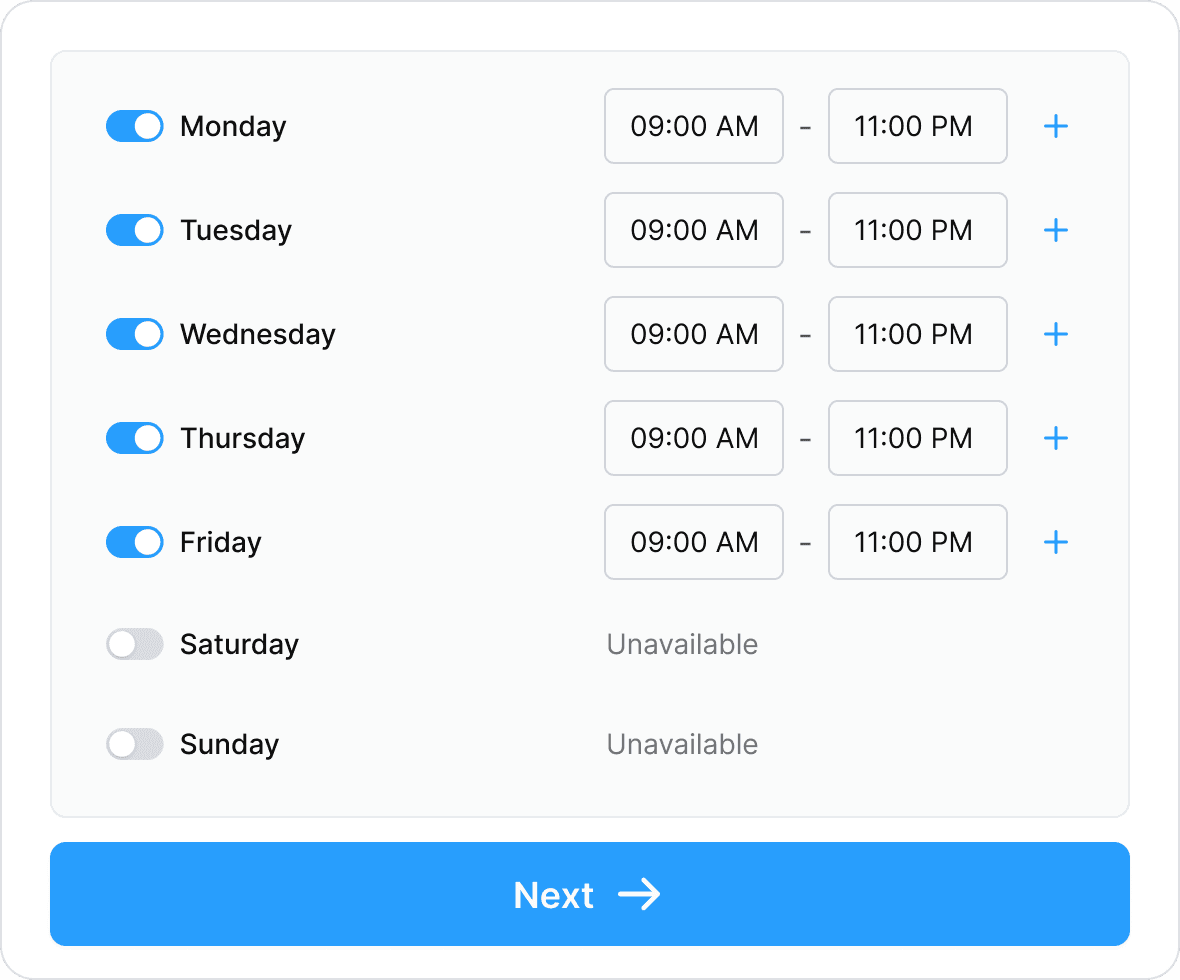
Timezone-aware availability to avoid double-bookings. Custom availability rules and time windows for each host.

Availability

Set when you are typically available for meetings

Monday

9:00 AM - 4:00PM

Tuesday

3:00PM - 9:00PM

Wednesday

10:00AM - 12:30 PM

Thursday

2:00 PM - 5:00 PM

Synced with Google Calendar & Outlook

Timezone-aware availability to avoid double-bookings. Custom availability rules and time windows for each host.

Availability

Set when you are typically available for meetings

Monday

9:00 AM - 4:00PM

Tuesday

3:00PM - 9:00PM

Wednesday

10:00AM - 12:30 PM

Thursday

2:00 PM - 5:00 PM

Synced with Google Calendar & Outlook

Timezone-aware availability to avoid double-bookings. Custom availability rules and time windows for each host.

Availability

Set when you are typically available for meetings

Monday

9:00 AM - 4:00PM

Tuesday

3:00PM - 9:00PM

Wednesday

10:00AM - 12:30 PM

Thursday

2:00 PM - 5:00 PM

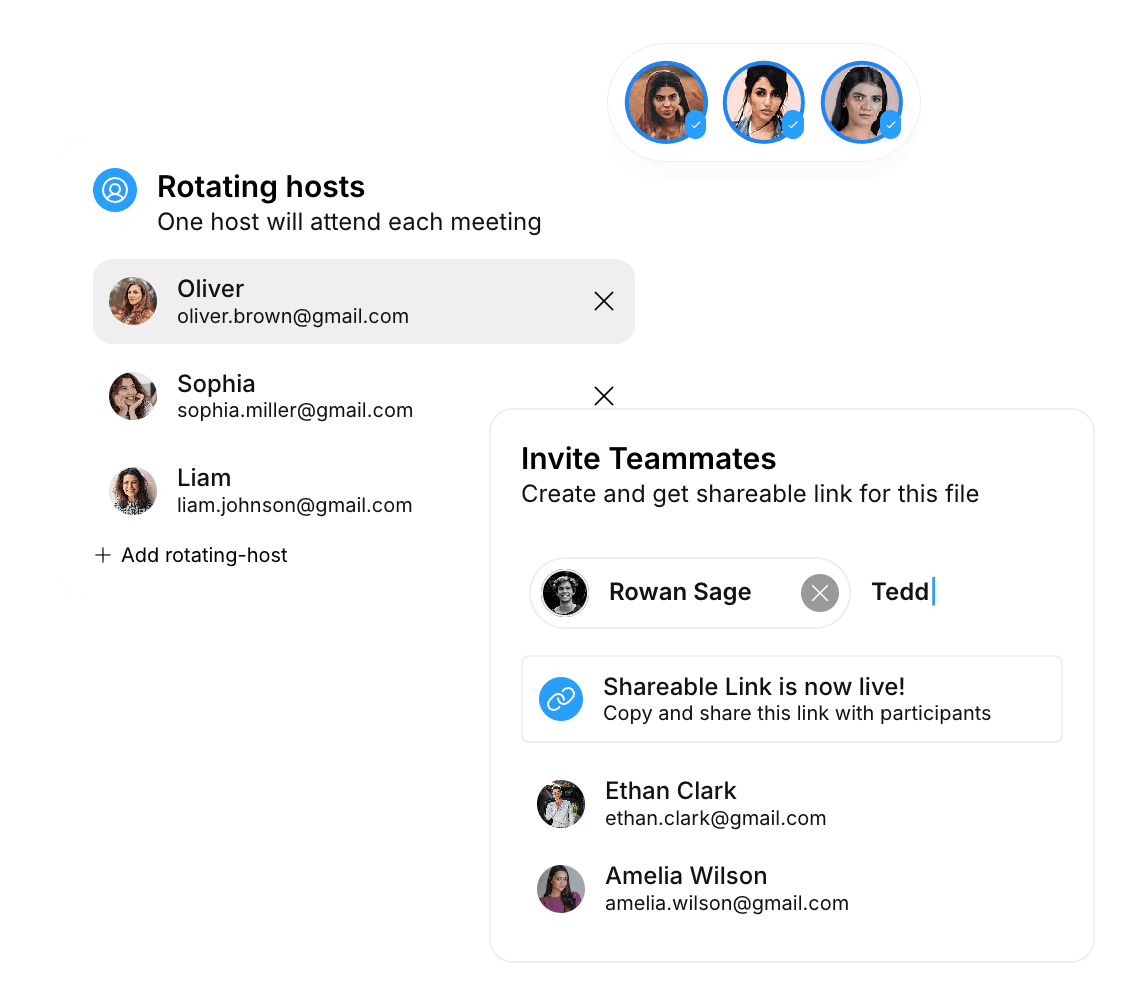
Rotating hosts

One host will attend each meeting

Oliver

oliver.brown@gmail.com

Sophia

sophia.miller@gmail.com

Liam

liam.johnson@gmail.com

Add rotating-host

Invite Teammates

Create and get shareable link for this file

Rowan Sage

Tedd|

Shareable Link is now live!

Create and get shareable link for this file

Ethan Clark

ethan.clark@gmail.com

Amelia Wilson

amelia.wilson@gmail.com

Rotating hosts

One host will attend each meeting

Oliver

oliver.brown@gmail.com

Sophia

sophia.miller@gmail.com

Liam

liam.johnson@gmail.com

Add rotating-host

Invite Teammates

Create and get shareable link for this file

Rowan Sage

Tedd|

Shareable Link is now live!

Create and get shareable link for this file

Ethan Clark

ethan.clark@gmail.com

Amelia Wilson

amelia.wilson@gmail.com

Rotating hosts

One host will attend each meeting

Oliver

oliver.brown@gmail.com

Sophia

sophia.miller@gmail.com

Liam

liam.johnson@gmail.com

Add rotating-host

Invite Teammates

Create and get shareable link for this file

Rowan Sage

Tedd|

Shareable Link is now live!

Create and get shareable link for this file

Ethan Clark

ethan.clark@gmail.com

Amelia Wilson

amelia.wilson@gmail.com

Manage Teams & Hosts Effortlessly

Easily coordinate your team, assign meetings, and create personalized host profiles for a seamless scheduling experience.

Assign meetings based on host priority to balance workload.

Assign meetings based on host priority to balance workload.

Secure, company-branded booking links for each host.

Secure, company-branded booking links for each host.

Create custom host profiles with name, avatar, and persona.

Create custom host profiles with name, avatar, and persona.

Distribute meetings to a single host or across the team.

Distribute meetings to a single host or across the team.

Smart Automation for Every Meeting

Automate reminders, confirmations, and follow-ups to save time and ensure every meeting runs smoothly.

Automated email and SMS reminders before and after meetings.

Automated email and SMS reminders before and after meetings.

Custom confirmation and next-step pages.

Custom confirmation and next-step pages.

Video meetings via Google Meet or Microsoft Teams.

Video meetings via Google Meet or Microsoft Teams.

Automatically prefilled forms with personalized details.

Automatically prefilled forms with personalized details.

Back

Enter Details

SELECTED TIME

Thu, Jan 15 at 16:00

Email

you@example.com

Phone Number

+93

URL

https://central.ai/your-username/

test meeting

Create

Project Sync

8:00 AM - 9:00 AM

+2

Google Meet

Join Now

Reminder:

You have a meeting scheduled at 9PM today

Back

Enter Details

SELECTED TIME

Thu, Jan 15 at 16:00

Email

you@example.com

Phone Number

+93

URL

https://central.ai/your-username/

test meeting

Create

Project Sync

8:00 AM - 9:00 AM

+2

Google Meet

Join Now

Reminder:

You have a meeting scheduled at 9PM today

Back

Enter Details

SELECTED TIME

Thu, Jan 15 at 16:00

Email

you@example.com

Phone Number

+93

URL

https://central.ai/your-username/

test meeting

Create

Project Sync

8:00 AM - 9:00 AM

+2

Google Meet

Join Now

Reminder:

You have a meeting scheduled at 9PM today

Calendar views

21

Meetings booked

4

Avg. meeting duration

0m

Page Views

Dec

Jan

Feb

Mar

Apr

May

Jun

200

150

100

50

0

Last 30 Days

Page Views

Dec

Jan

Feb

Mar

Apr

May

Jun

200

150

100

50

0

Last 30 Days

Scheduler

Manage your event types and availability

Calendar views

21

Meetings booked

4

Avg. meeting duration

0m

Page Views

Dec

Jan

Feb

Mar

Apr

May

Jun

200

150

100

50

0

Last 30 Days

Page Views

Dec

Jan

Feb

Mar

Apr

May

Jun

200

150

100

50

0

Last 30 Days

Scheduler

Manage your event types and availability

Calendar views

21

Meetings booked

4

Avg. meeting duration

0m

Page Views

Dec

Jan

Feb

Mar

Apr

May

Jun

200

150

100

50

0

Last 30 Days

Page Views

Dec

Jan

Feb

Mar

Apr

May

Jun

200

150

100

50

0

Last 30 Days

Scheduler

Manage your event types and availability

Track Every Meeting, Optimize Every Workflow

Get insights on bookings and attendee activity to streamline your scheduling and boost efficiency.

Track page views, calendar views, and scheduled meetings.

Track page views, calendar views, and scheduled meetings.

Emit events for marketing and analytics platforms.

Emit events for marketing and analytics platforms.

Measure conversion rates and optimize your scheduling workflow.

Measure conversion rates and optimize your scheduling workflow.

Integrations

Integrate with 8,000+ apps instantly

Central works with your existing tools. Leads, calls, and data sync automatically.

  • Zapier

    Cal.com

    Pipedrive

    Zendesk

    Twilio

    Salesforce

    Shopify

    Slack

    Stripe

    Woo Commerce

    Big Commerce

    Simple Practice

    Housecall Pro

  • Hubspot

    Calendly

    Typeform

    Square

    Intuit

    Setmore

    Zoho

    Formstack

    Framer

    Whatsapp

    Instagram

    Facebook

    Clio

How It Works

Everything you need, and more.

Central goes further with tools that keep you organized, connected, and always in the loop.

Google Calendar

Connected

Set as Default

Outlook Calendar

Connect

Connect Your Calendar

Connect Your Calendar

Define your working hours, block off weekends, and add buffers — your schedule, your rules.

Monday

09:00 AM

-

05:00 PM

Tuesday

09:00 AM

-

05:00 PM

Wednesday

Unavailable

Thursday

Unavailable

Set Your Availability

Define your working hours, block off weekends, and add buffers — your schedule, your rules.

Share & Let Clients Book

Send your scheduling link via email, embed on your website, or share in chats — clients book instantly.

Confirmations & Reminders

Meetings are automatically confirmed and reminders are sent — reducing no-shows and keeping everyone on track.

Testimonials

Customers love using Central

See how Central's answering service makes a positive difference.

Emily R.

Manager, BrightWave Solutions

"TryCentral made booking meetings effortless. Our clients love how fast and easy it is to schedule appointments."



Emily R.

Manager, BrightWave Solutions

"TryCentral made booking meetings effortless. Our clients love how fast and easy it is to schedule appointments."


Raj P.

Sales Lead, ConnectPro

"We no longer worry about double bookings. The calendar sync with Google and Outlook keeps everything on track."

Raj P.

Sales Lead, ConnectPro

"We no longer worry about double bookings. The calendar sync with Google and Outlook keeps everything on track."

Sophie L.

Consultant, Luma Advisory

"The branded booking pages make us look professional, and clients love the seamless experience."

Sophie L.

Consultant, Luma Advisory

"The branded booking pages make us look professional, and clients love the seamless experience."

Carlos M.

Business Owner, HealthFirst Clinics

"Embedding the scheduler on our website was effortless, and the floating 'Book Now' button keeps it accessible everywhere."


Carlos M.

Business Owner, HealthFirst Clinics

"Embedding the scheduler on our website was effortless, and the floating 'Book Now' button keeps it accessible everywhere."


Leo W.,

Operations Lead, FinServe Solutions

"Automated reminders cut our no-show rate dramatically. Our team saves hours every week."


Leo W.,

Operations Lead, FinServe Solutions

"Automated reminders cut our no-show rate dramatically. Our team saves hours every week."


Isabella Davis

Operations Lead

"TryCentral tracks every meeting and integrates with our analytics. Now we can optimize our scheduling process and improve conversions"

Isabella Davis

Operations Lead

"TryCentral tracks every meeting and integrates with our analytics. Now we can optimize our scheduling process and improve conversions"

Loved by 1000+ businesses

Don't miss another call with #1 AI receptionist.

Central's AI receptionist automatically qualifies leads, answers questions, books meetings, and transfers calls.

Call our receptionist

Play the audio

Your Reception

Monitor and manage your your AI receptionist

Calls

Action items

Training

Insights

Today

4

Answered questions about Central AI and booked a call

See call summary

Megan called with concerns about missing potential clients due to being unavailable. I explained how Central AI answers calls 24/7, captures lead information, and books appointments directly into her calendar and CRM. She was relieved to hear this and agreed to book a call to explore a tailored setup for her business.

2:38pm

Scheduled a demo appointment with caller

See call summary

Megan confirmed interest in speaking with our team, so I offered real-time availability based on her time zone (San Francisco). She chose a slot on June 12th at 9:30 a.m., provided her email, and I instantly booked the meeting and sent her a confirmation via email and calendar invite. She confirmed she received it and was impressed by how seamless it was.

1:55pm

Confirmed appointment and transferred caller to a team member

See call summary

After her appointment was confirmed, Megan had some detailed follow-up questions. I confirmed she received her email and calendar invite, then offered to transfer her to a live team member for deeper support. I initiated the transfer smoothly, ensuring continuity in the conversation.

9:00am

Captured lead details and prepared to assist

See call summary

Megan reached out after browsing our website. I greeted her, asked for her name, confirmed the spelling, and assured her I was ready to help. By collecting her contact information early, I ensured a personalized and professional interaction while preparing to answer her questions about Central AI.

8:24am

Yesterday

5

Loved by 1000+ businesses

Don't miss another call with #1 AI receptionist.

Central's AI receptionist automatically qualifies leads, answers questions, books meetings, and transfers calls.

Call our receptionist

Play the audio

Your Reception

Monitor and manage your your AI receptionist

Calls

Action items

Training

Insights

Your AI receptionist's number

Today

4

Answered questions about Central AI and booked a call

See call summary

Megan called with concerns about missing potential clients due to being unavailable. I explained how Central AI answers calls 24/7, captures lead information, and books appointments directly into her calendar and CRM. She was relieved to hear this and agreed to book a call to explore a tailored setup for her business.

2:38pm

Scheduled a demo appointment with caller

See call summary

Megan confirmed interest in speaking with our team, so I offered real-time availability based on her time zone (San Francisco). She chose a slot on June 12th at 9:30 a.m., provided her email, and I instantly booked the meeting and sent her a confirmation via email and calendar invite. She confirmed she received it and was impressed by how seamless it was.

1:55pm

Confirmed appointment and transferred caller to a team member

See call summary

After her appointment was confirmed, Megan had some detailed follow-up questions. I confirmed she received her email and calendar invite, then offered to transfer her to a live team member for deeper support. I initiated the transfer smoothly, ensuring continuity in the conversation.

9:00am

Captured lead details and prepared to assist

See call summary

Megan reached out after browsing our website. I greeted her, asked for her name, confirmed the spelling, and assured her I was ready to help. By collecting her contact information early, I ensured a personalized and professional interaction while preparing to answer her questions about Central AI.

8:24am

Yesterday

5

Loved by 1000+ businesses

Don't miss another call with #1 AI receptionist.

Central's AI receptionist automatically qualifies leads, answers questions, books meetings, and transfers calls.

Call our receptionist

Play the audio

Your Reception

Monitor and manage your your AI receptionist

Calls

Action items

Training

Insights

Your AI receptionist's number

Today

4

Answered questions about Central AI and booked a call

See call summary

Megan called with concerns about missing potential clients due to being unavailable. I explained how Central AI answers calls 24/7, captures lead information, and books appointments directly into her calendar and CRM. She was relieved to hear this and agreed to book a call to explore a tailored setup for her business.

2:38pm

Scheduled a demo appointment with caller

See call summary

Megan confirmed interest in speaking with our team, so I offered real-time availability based on her time zone (San Francisco). She chose a slot on June 12th at 9:30 a.m., provided her email, and I instantly booked the meeting and sent her a confirmation via email and calendar invite. She confirmed she received it and was impressed by how seamless it was.

1:55pm

Confirmed appointment and transferred caller to a team member

See call summary

After her appointment was confirmed, Megan had some detailed follow-up questions. I confirmed she received her email and calendar invite, then offered to transfer her to a live team member for deeper support. I initiated the transfer smoothly, ensuring continuity in the conversation.

9:00am

Captured lead details and prepared to assist

See call summary

Megan reached out after browsing our website. I greeted her, asked for her name, confirmed the spelling, and assured her I was ready to help. By collecting her contact information early, I ensured a personalized and professional interaction while preparing to answer her questions about Central AI.

8:24am

Yesterday

5

FAQ

Frequently Asked Questions

Does TryCentral provide analytics on bookings?

Definitely! Track page views, booked meetings, and integrate with marketing tools for performance insights.

Can I prefill forms for my clients?

Definitely! Prefill form fields like name, email, and phone via URL parameters to make booking faster and smoother.

Can I track bookings and measure performance?

Yes! TryCentral tracks calendar views, bookings, and meeting events, and integrates with analytics tools for conversion tracking.

Can I embed the scheduler on my website?

Yes, TryCentral supports inline embedding and a floating “Book Now” button for seamless visitor bookings.

Can multiple team members share booking availability?

Yes, you can assign hosts individually, use round-robin, or set priority-based scheduling to manage your team efficiently.

Does it integrate with Google Calendar and Outlook?

Absolutely! Your calendar stays in sync across platforms, so no double-bookings or missed meetings.

How fast can I schedule meetings compared to other tools?

TryCentral is up to 10x faster than Calendly, Hubspot Meetings, or Zoho Bookings, letting you book more in less time.