The inbox you already use just got much more powerful.

You're already living in email. Central meets you there. Email ask@trycentral.com to summarize threads, draft replies, pull reports, schedule meetings — without opening a single new tool.
  • Live in minutes

  • 10-day free trial 

  • Cancel anytime 

  • Live in minutes

  • 10-day free trial 

  • Cancel anytime 

How it works

How it works

Three steps. Then just email.

Central connects to your tools and learns your context once. After that, every email to ask@trycentral.com gets things done across your entire stack.

Connect your tools

Link your calendar, CRM, inbox, and any other tools you use. Setup takes under 5 minutes. Central learns your preferences and writing style automatically.

Email what you need

Write a message to ask@trycentral.com like you'd email a person. Or forward a thread with a quick note. Central understands plain English — no special syntax.

Get it done — fast

Central responds in your inbox with the work done. Draft ready to review. Report attached. Meeting confirmed. Task created. Everything lands right where you already are.


Inbox Reality

Your Inbox Is Costing You Time

Writing emails, chasing replies, and keeping threads alive shouldn't take up your day. Central automates the repetitive work so you stay responsive while focusing on higher-value tasks.

4 hrs

Spent on email every day

The average professional sends 40 emails a day and reads 120. Most of that time is reactive work that AI can handle.

30%

Of emails never get a proper reply

Follow-ups get dropped. Threads go cold. Leads stop hearing from you. Not because you forgot — because there wasn't enough time.

Zero

New tools to learn

You already know how to write an email. That's everything you need to use Central. No login, no dashboard, no onboarding.

Inbox Reality

Your Inbox Is Costing You Time

Writing emails, chasing replies, and keeping threads alive shouldn't take up your day. Central automates the repetitive work so you stay responsive while focusing on higher-value tasks.

4 hrs

Spent on email every day

The average professional sends 40 emails a day and reads 120. Most of that time is reactive work that AI can handle.

30%

Of emails never get a proper reply

Follow-ups get dropped. Threads go cold. Leads stop hearing from you. Not because you forgot — because there wasn't enough time.

Zero

New tools to learn

You already know how to write an email. That's everything you need to use Central. No login, no dashboard, no onboarding.

What you can do

What you can do

Everything that's eating your day handled by email.

Whatever you'd ask an assistant to do, ask Central. It handles it and replies back with the work done.

Draft Replies

Forward any email and ask Central to draft a reply. It learns your voice and writes responses the way you'd write them — ready to review and send.

Generate Reports

Ask for any report and it lands in your inbox. CRM pipeline, support ticket summary, revenue by channel — Central pulls the data and formats it cleanly.

Process Attachments

Attach a PDF, CSV, image, or contract. Central reads it, extracts what matters, and gives you answers — without you having to open the file yourself.

Send Follow-Ups

Tell Central who to follow up with and it handles it. Drafts the message in your voice, checks your last interaction, and sends it at the right time.

Schedule Meetings

Tell Central who to meet, when, and for how long. It checks calendars, picks a time, and sends the invite — all before your next response.

Forward & Summarize

Stop re-reading 47-email threads. Forward any chain to Central with one note and get back a clean summary + action items in minutes.

Automate Recurring Tasks

Set up recurring emails to get recurring work done. "Every Monday at 8am, email me a pipeline summary" — it runs automatically, every week.

Research & Enrich

Ask Central to research a person, company, or topic. It searches across your connected tools and the web, then emails you back a structured briefing.

See it in action

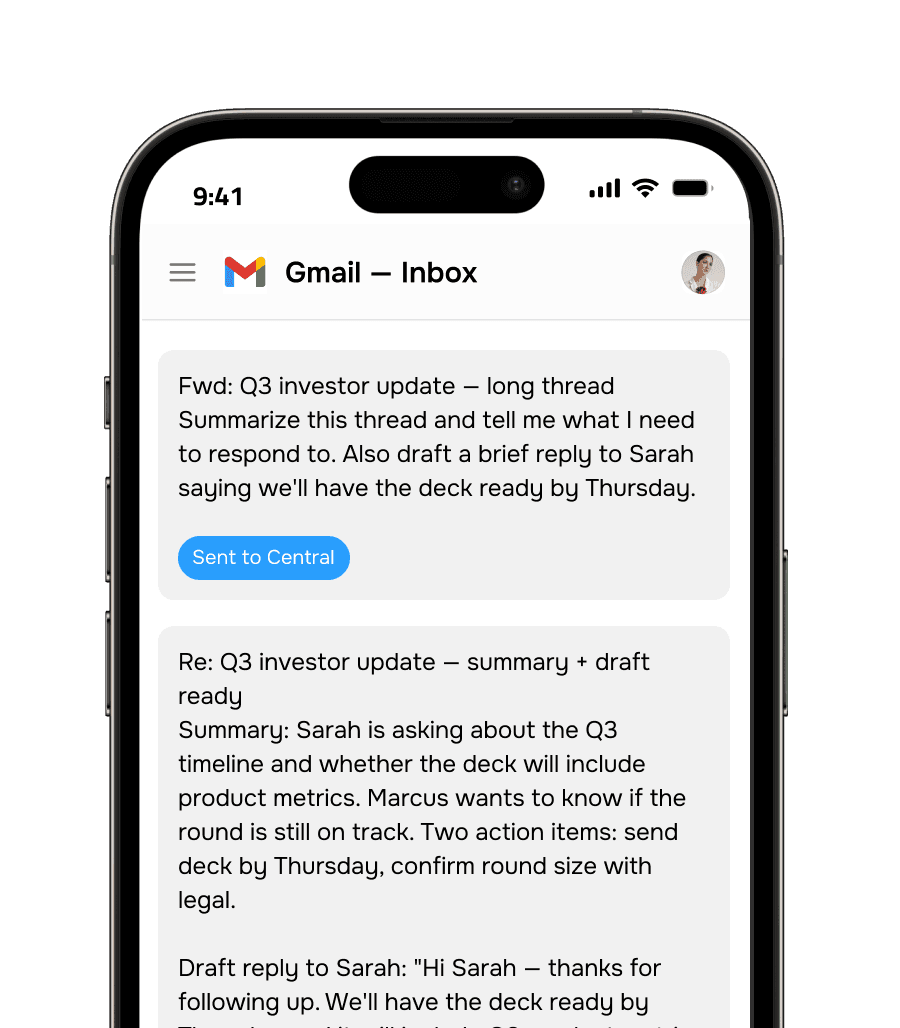
Forward a thread. Get back what you need.

Forward a thread. Get back what you need.

The most common thing people do: forward a long email thread with a note. Central comes back with the summary, action items, and a draft reply — right in your inbox. No context switching. No new tool to open.

Responds in under 2 minutes

Learns your writing voice over time

Works with Gmail, Outlook, and more

Pulls live data from your connected tools

Feel confident.

Questions about Central via email

What email address do I send to?

Send to ask@trycentral.com. Once you've connected your account, Central will recognize your email address and know who you are, what tools you have connected, and what context you've set. You can also CC it on existing threads to pull it into a conversation.

What can I attach?

Central can read and process PDFs, Word documents, spreadsheets (Excel, CSV), images, and plain text files. It can extract data, summarize content, answer questions about the document, or use it as context for a draft — just tell it what you need in the email body.

How fast does it respond?

Most requests are handled in under 2 minutes. Simple tasks (summaries, drafts, quick lookups) usually come back in under 60 seconds. Complex requests — like generating a multi-source report or researching a company — may take 2–5 minutes. Central will always reply to confirm it received your request.

Is my email data private?

Yes. Your emails are processed securely and never used to train AI models. Central only accesses the content you explicitly share by emailing it. Connected tool data is accessed only when you ask for it. You can revoke access to any tool at any time from your Central account.

Can I set up recurring emails — like a weekly report?

Yes. Just tell Central to set up a recurring request: "Every Monday at 9am, email me a summary of open deals closing this quarter." It creates a scheduled job and runs it automatically. You can modify or cancel it anytime by emailing Central.

What email address do I send to?

Send to ask@trycentral.com. Once you've connected your account, Central will recognize your email address and know who you are, what tools you have connected, and what context you've set. You can also CC it on existing threads to pull it into a conversation.

What can I attach?

Central can read and process PDFs, Word documents, spreadsheets (Excel, CSV), images, and plain text files. It can extract data, summarize content, answer questions about the document, or use it as context for a draft — just tell it what you need in the email body.

How fast does it respond?

Most requests are handled in under 2 minutes. Simple tasks (summaries, drafts, quick lookups) usually come back in under 60 seconds. Complex requests — like generating a multi-source report or researching a company — may take 2–5 minutes. Central will always reply to confirm it received your request.

Is my email data private?

Yes. Your emails are processed securely and never used to train AI models. Central only accesses the content you explicitly share by emailing it. Connected tool data is accessed only when you ask for it. You can revoke access to any tool at any time from your Central account.

Can I set up recurring emails — like a weekly report?

Yes. Just tell Central to set up a recurring request: "Every Monday at 9am, email me a summary of open deals closing this quarter." It creates a scheduled job and runs it automatically. You can modify or cancel it anytime by emailing Central.

Your inbox does more now.

Connect Central in 5 minutes and start getting more done from the email app you already live in.

Your inbox does more now.

Connect Central in 5 minutes and start getting more done from the email app you already live in.