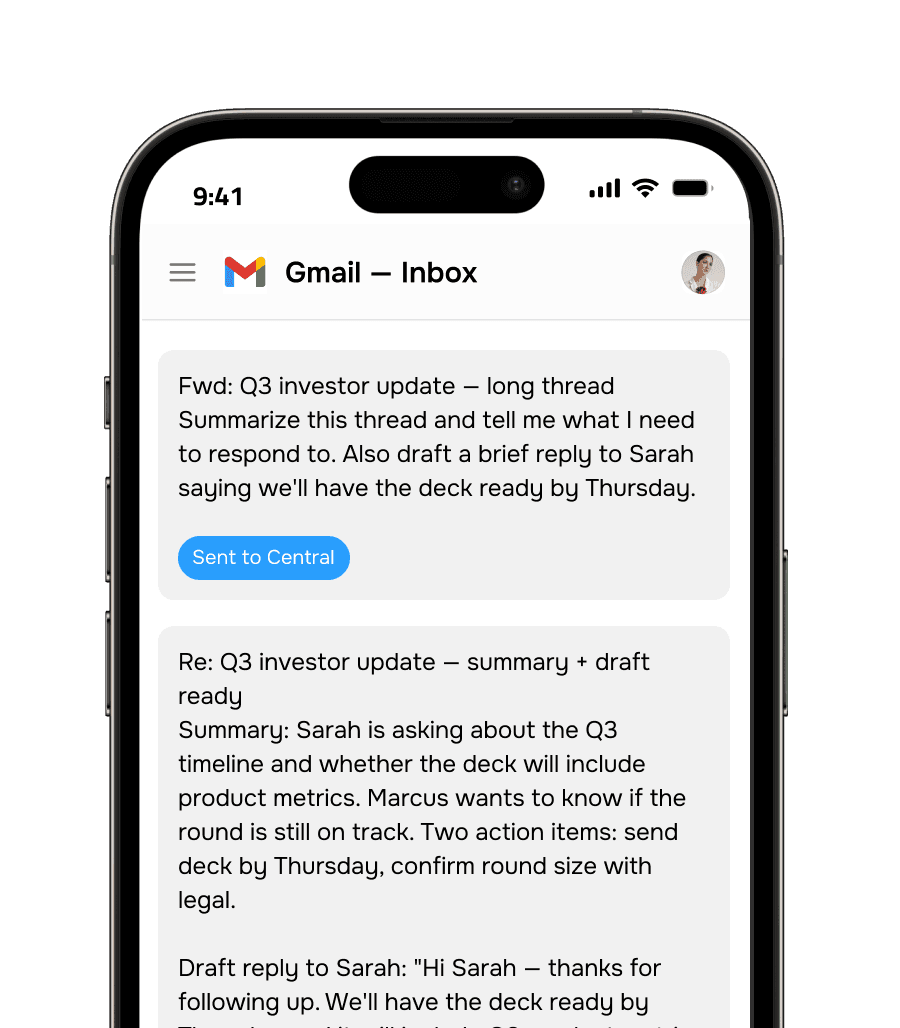
The inbox you already use just got much more powerful.

You're already living in email. Central meets you there. Email ask@trycentral.com to summarize threads, draft replies, pull reports, schedule meetings — without opening a single new tool.
  • Live in minutes

  • 10-day free trial 

  • Cancel anytime 

  • Live in minutes

  • 10-day free trial 

  • Cancel anytime 

How it works

How it works

Three steps. Then just email.

Central connects to your tools and learns your context once. After that, every email to ask@trycentral.com gets things done across your entire stack.


01
Connect your tools

Link your calendar, CRM, inbox, and any other tools you use. Setup takes under 5 minutes. Central learns your preferences and writing style automatically.

01
Connect your tools

Link your calendar, CRM, inbox, and any other tools you use. Setup takes under 5 minutes. Central learns your preferences and writing style automatically.

02
Email what you need

Write a message to ask@trycentral.com just like you'd email a person. Or forward a thread with a quick note. Central understands plain English — no special syntax.

02
Email what you need

Write a message to ask@trycentral.com just like you'd email a person. Or forward a thread with a quick note. Central understands plain English — no special syntax.

03
Get it done — fast

Central responds in your inbox with the work done. Draft ready to review. Report attached. Meeting confirmed. Task created. Everything lands right where you already are.

03
Get it done — fast

Central responds in your inbox with the work done. Draft ready to review. Report attached. Meeting confirmed. Task created. Everything lands right where you already are.

4 hrs

Spent on email every day

The average professional sends 40 emails a day and reads 120. Most of that time is reactive work that AI can handle.

30%

Of emails never get a proper reply

Follow-ups get dropped. Threads go cold. Leads stop hearing from you. Not because you forgot — because there wasn't enough time.

Zero

New tools to learn

You already know how to write an email. That's everything you need to use Central. No login, no dashboard, no onboarding.

4 hrs

Spent on email every day

The average professional sends 40 emails a day and reads 120. Most of that time is reactive work that AI can handle.

30%

Of emails never get a proper reply

Follow-ups get dropped. Threads go cold. Leads stop hearing from you. Not because you forgot — because there wasn't enough time.

Zero

New tools to learn

You already know how to write an email. That's everything you need to use Central. No login, no dashboard, no onboarding.

What you can do

What you can do

Everything that's eating your day handled by email.

Whatever you'd ask an assistant to do, ask Central. It handles it and replies back with the work done.

Draft Replies

Forward any email and ask Central to draft a reply. It learns your voice and writes responses the way you'd write them — ready to review and send.

Generate Reports

Ask for any report and it lands in your inbox. CRM pipeline, support ticket summary, revenue by channel — Central pulls the data and formats it cleanly.

Process Attachments

Attach a PDF, CSV, image, or contract. Central reads it, extracts what matters, and gives you answers — without you having to open the file yourself.

Send Follow-Ups

Tell Central who to follow up with and it handles it. Drafts the message in your voice, checks your last interaction, and sends it at the right time.

Schedule Meetings

Tell Central who to meet, when, and for how long. It checks calendars, picks a time, and sends the invite — all before your next response.

Forward & Summarize

Stop re-reading 47-email threads. Forward any chain to Central with one note and get back a clean summary + action items in minutes.

Automate Recurring Tasks

Set up recurring emails to get recurring work done. "Every Monday at 8am, email me a pipeline summary" — it runs automatically, every week.

Research & Enrich

Ask Central to research a person, company, or topic. It searches across your connected tools and the web, then emails you back a structured briefing.

See it in action

Slash commands. Group workflows. Real results.

Slash commands. Group workflows. Real results.

Telegram power users don't want to open another app to run a business task. Central brings everything into the interface they're already in — with slash commands for speed and plain language for everything else.

Slash commands for power-user speed

Add to groups — the whole team can use it

Files, documents, and images — all supported

Available 24/7 — no session timeouts

Feel confident.

Questions about Central on Telegram

How do I find Central on Telegram?

After connecting your Central account and linking it to Telegram, you'll be given a link to start a chat with the @CentralAI bot. Search for it in Telegram or click the link — it opens immediately. The bot connects to your workspace automatically based on your Central account.

Can I add Central to a Telegram group?

Yes. Add @CentralAI to any Telegram group. Once added, any group member can @mention Central to run a task. Each person's requests are routed through their own connected accounts — so when Jordan runs a CRM update, it uses Jordan's HubSpot credentials, not Sarah's.

What slash commands are available?

Built-in commands include /brief (morning briefing), /pipeline (pipeline summary), /schedule (schedule a meeting), /task (create a task), /crm (CRM update), /report (pull a report), and /help (full command list). You can also create custom commands for workflows you run regularly.

Is it secure to use Telegram for work data?

Central uses the Telegram Bot API, which is server-side (not Secret Chat). Messages between you and the bot are encrypted in transit but not end-to-end on Telegram's servers. For sensitive requests, use the bot in a 1:1 private chat. Central encrypts all your connected tool credentials at rest and never stores message content beyond processing.

Can I send files and documents to Central on Telegram?

Yes. Drop any file — PDF, Word doc, spreadsheet, image — into the chat and ask Central to process it. Common requests: summarize a document, extract action items, pull data from a spreadsheet, read a business card image, or review a contract for key terms.

How do I find Central on Telegram?

After connecting your Central account and linking it to Telegram, you'll be given a link to start a chat with the @CentralAI bot. Search for it in Telegram or click the link — it opens immediately. The bot connects to your workspace automatically based on your Central account.

Can I add Central to a Telegram group?

Yes. Add @CentralAI to any Telegram group. Once added, any group member can @mention Central to run a task. Each person's requests are routed through their own connected accounts — so when Jordan runs a CRM update, it uses Jordan's HubSpot credentials, not Sarah's.

What slash commands are available?

Built-in commands include /brief (morning briefing), /pipeline (pipeline summary), /schedule (schedule a meeting), /task (create a task), /crm (CRM update), /report (pull a report), and /help (full command list). You can also create custom commands for workflows you run regularly.

Is it secure to use Telegram for work data?

Central uses the Telegram Bot API, which is server-side (not Secret Chat). Messages between you and the bot are encrypted in transit but not end-to-end on Telegram's servers. For sensitive requests, use the bot in a 1:1 private chat. Central encrypts all your connected tool credentials at rest and never stores message content beyond processing.

Can I send files and documents to Central on Telegram?

Yes. Drop any file — PDF, Word doc, spreadsheet, image — into the chat and ask Central to process it. Common requests: summarize a document, extract action items, pull data from a spreadsheet, read a business card image, or review a contract for key terms.

Your team already uses Telegram. Now it can get work done there too.

Connect Central to Telegram in 2 minutes. Power-user commands, group support, and always-on availability from the app your team trusts.

Your team already uses Telegram. Now it can get work done there too.

Connect Central to Telegram in 2 minutes. Power-user commands, group support, and always-on availability from the app your team trusts.